Pint 1 - technical planning
If you haven’t read the previous post, here’s the tl;dr.
The decision has been made - I’m writing a full-blown reimplementation of mspaint.exe from Windows 10. All the features. All the tools, brushes, behaviors, dialog windows, the GUI, everything.
Admittedly, Paint has some bugs. The question is - should I implement them? It’s hard to say at this point. I’ll decide as I go. Some weird behaviors that could be seen as bugs may actually be useful for some users or can be viewed as iconic features worth remembering. Those are worth keeping. Implementing, actually. Other quirks can be straight up annoying and useless. Those would be implemented in a more sane manner. I’ll make notes in future posts whenever I encounter a dilemma.
A little disclaimer: I’m no expert in raster graphics editors. I’m just a software developer with an idea and I’ll be learning and making mistakes throughout the series. The hope is that my experience in programming and software design will keep the mistakes small and recoverable.
The language
I settled on C++ as the programming language for Pint. Yes, I know, it’s an unpopular choice these days. I’ve had a few adventures with more modern languages like Rust, Go, and OCaml. I also considered learning Zig. They all have their pros and cons, but what eventually made me stick to C++ was the simple fact that it’s the language I know the best and I’m the most comfortable with. I wouldn’t want to start such an involved project in a language I’m still learning and introduce fundamental, hard to fix issues at the beginning.
The argument that C++ is too convoluted and hard to understand is often valid, but not so much in the case of a single-person project. Everybody has their own subset of the language that they use and consider sane. Mine is pretty much C++11 with some selected quality of life additions from more recent versions, like designated initializers or inline static member definition. I’m pretty sure I can manage the complexity without stepping into variadic SFINAE metaprogramming hell.
GPU-based implementation
Since I work with GPU drivers professionally, I decided to implement the editor entirely, or at least mostly, on a GPU. Vulkan is my API of choice due to its flexibility, wide adoption and cross-OS support. Now, you might ask: is it really worth it? Are simple raster graphics operations in Paint parallel enough to justify it? I’m not sure about the answer. I think it depends on the tool being used. Pencil tool, for instance, seems to be very easily implemented on CPU and there are probably no big advantages in a parallel implementation. Shape tools, like rectangle drawing, on the other hand, should benefit greatly from a parallel operation because of the sheer amount of pixels being touched. Wouldn’t it be easier to use SSE or AVX? Maybe. GPUs are what I like, though, so I’ll stick to that.
My plan, however, is to structure the project in a way that would allow implementing certain tools on CPU, GPU, or even both simultaneously. The reason is twofold. First, it would allow me to compare the implementations and draw some interesting conclusions. Second, I’m not convinced I’ll be able to implement every tool on the GPU. See, some problems are notoriously difficult to execute in parallel. Usually inter-task dependencies, communication and dynamic work generation are the main pain points1. The biggest challenge I have in my mind is the bucket fill tool2. When you think about it, there is no trivial way to parallelize it. One has to do some extra reading.
UI programming
Apart from the image manipulation algorithms, I also had to implement the user interface. And I needed to select the right technology for that. I was aiming for a pixel-perfect, 100% faithful recreation of the interface. I picked Dear ImGui, further referred to as just ImGui, as the GUI library I’d be using. It is often associated with debug tools or game overlays, but it’s a perfectly fine library to build full-blown applications with. ImGui has a lot of preexisting customizable controls, but it also allows access to more low level interfaces for drawing basic shapes. Exactly what I’d need to recreate an existing application. It doesn’t really provide any helpers for responsive design or DPI handling, but I probably wouldn’t use it anyway, because I’d want to perfectly recreate what the original Paint does. I was going to be rawdogging the UI pretty much. Hardcoding the pixel offsets and sizes. It does feel crude, but it’s the only way to perfectly recreate the look and feel of the original.
Windowing system interface
My goal is to support both Windows and Linux (X11 and Wayland). And to do it with as little platform-specific code as possible. I’m already used to GLFW, so I will use it for window management. Despite the name, it doesn’t limit you to OpenGL, if you call glfwWindowHint(GLFW_CLIENT_API, GLFW_NO_API). Fortunately, there’s not much platform specific Vulkan code either3. The only required thing is creating a presentable surface with an extension like VK_KHR_win32_surface, but that’s also wrapped with GLFW.
Whole architecture
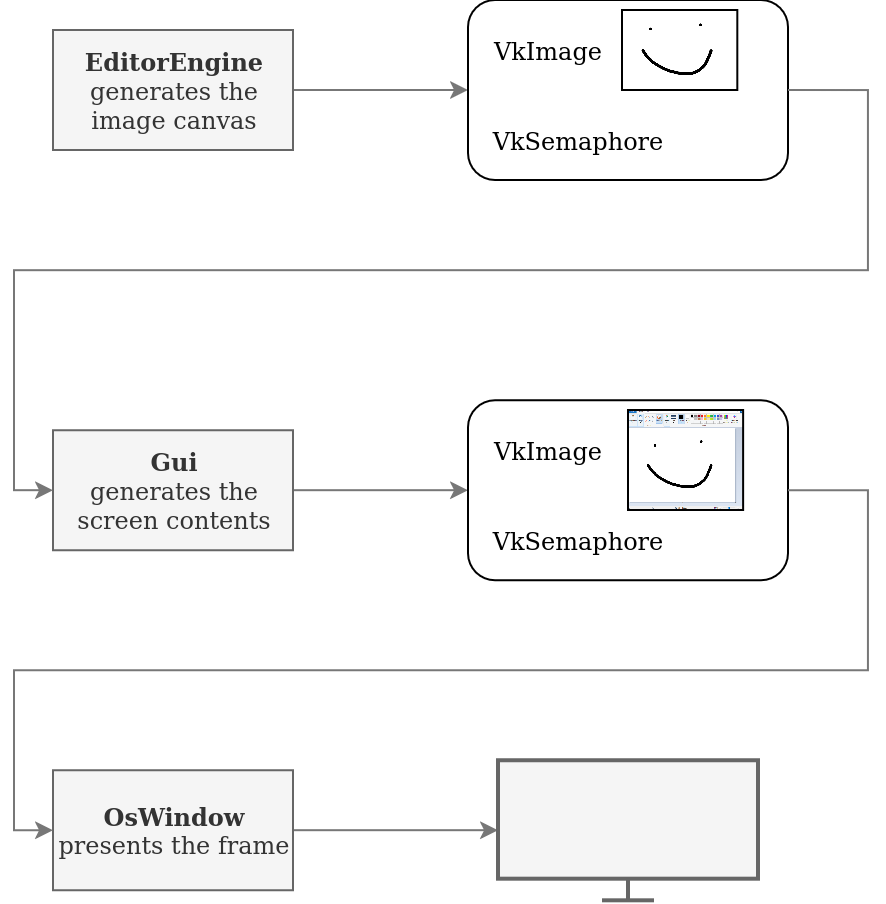
The editing algorithms, tools and canvas updating will be implemented in EditorEngine class. It will record and submit its Vulkan command buffer every frame and return a reference to rendered VkImage along with a VkSemaphore that will be signalled once the rendering is done. It’s a nicely decoupled design that allows testing EditorEngine class in isolation, without any other parts of the application.
This output will be routed to the Gui class. The Gui will render all the UI, background and the image from EditorEngine (possibly scrolled and/or zoomed in/out) onto its own image. It will also record its own command buffer and synchronize it with the semaphore from EditorEngine. Finally, it will return the same thing as EditorEngine - an image and a semaphore ready to be used by the next block in the pipeline.
This will go to OsWindow class which will be a wrapper around GLFW window and swapchain, which will handle presentation and, possibly, resizing behavior.
Testing
I generally aim to have my software be well tested.
This has been especially true in the days of LLM-aided programming.
I’m no stranger to Codex, Claude Code and the rest of the gang, but in general I don’t like to let them loose entirely.
Good tests provide a tight feedback loop for an AI agent and reduce the number of situations when it says it’s done, but when you check the result, it’s a complete mess.
At the same time, I’m cautious not to flood my codebase with useless unit tests for every single function that only make it hard to refactor.
You have to find the balance.
With that philosophy in mind, I planned Pint’s tests to be mainly integration-level: really running the image manipulation algorithms, copying the results from GPU to CPU and verifying them. They would still be white box tests - instantiating internal objects and calling their methods rather than externally calling the executable, which is problematic, especially in CI. UI tests would be done too. Fortunately, ImGui allows to query a lot about the last frame’s controls. It’s possible to execute the UI code without creating OS-level windows and testing various things by simulating user inputs. Simple unit tests could pop up too, targeting corner cases in scenarios that are difficult to cover otherwise.
Conclusion
Next up: the early prototype stage. We’ll walk through implementing the first tool from scratch, focusing on the GPU side of things. The UI can wait — first, we need to know if this is going anywhere.
The industry is slowly evolving into more GPU-driven pipelines with features like indirect dispatches, device generated commands, work graphs or amplification shaders. ↩︎
Cool kids in academia call it connected component labelling. ↩︎
Contrary to OpenGL, where you have to deal with WGL/GLX/EGL/CGL hell, fortunately abstracted away by GLFW for most usecases. ↩︎