Pint 2 - first steps
In this article we’ll lay the foundations of Pint - our raster graphics editor. Writing a graphics application is usually a ton of work and boilerplate. Window creation, proper abstractions, logging, error checking, tool integration, shader compilation, memory allocation helpers and much more. I’ll spare you the details as most of this stuff is pretty dull. Instead, I’ll talk about some more interesting decisions I had to make and show first working builds.
Storing the canvas
The canvas (the image being edited) has to be stored on the GPU.
The most obvious way to do it is to just allocate a single VkImage with dimensions matching exactly the dimensions of the image.
However, I discovered most production grade editors that are out there do not do this.
Programs like Gimp, Krita or Photoshop use a tile-based approach. The canvas is subdivided into multiple equal-sized smaller images (tiles) that form a logical grid that the editor operates on.
As an example, an editor using 64x64 tiles would represent a 300x192 image as a grid of 5x3 tiles.
The width is not divisible by 64, but a full tile is still allocated, wasting some memory.
It’s not a big issue though, because it will only happen on canvas boundaries.
Also, modern GPUs allocate memory in blocks for performance anyway, so allocating a single 300x192 image would likely waste memory in a similar fashion.
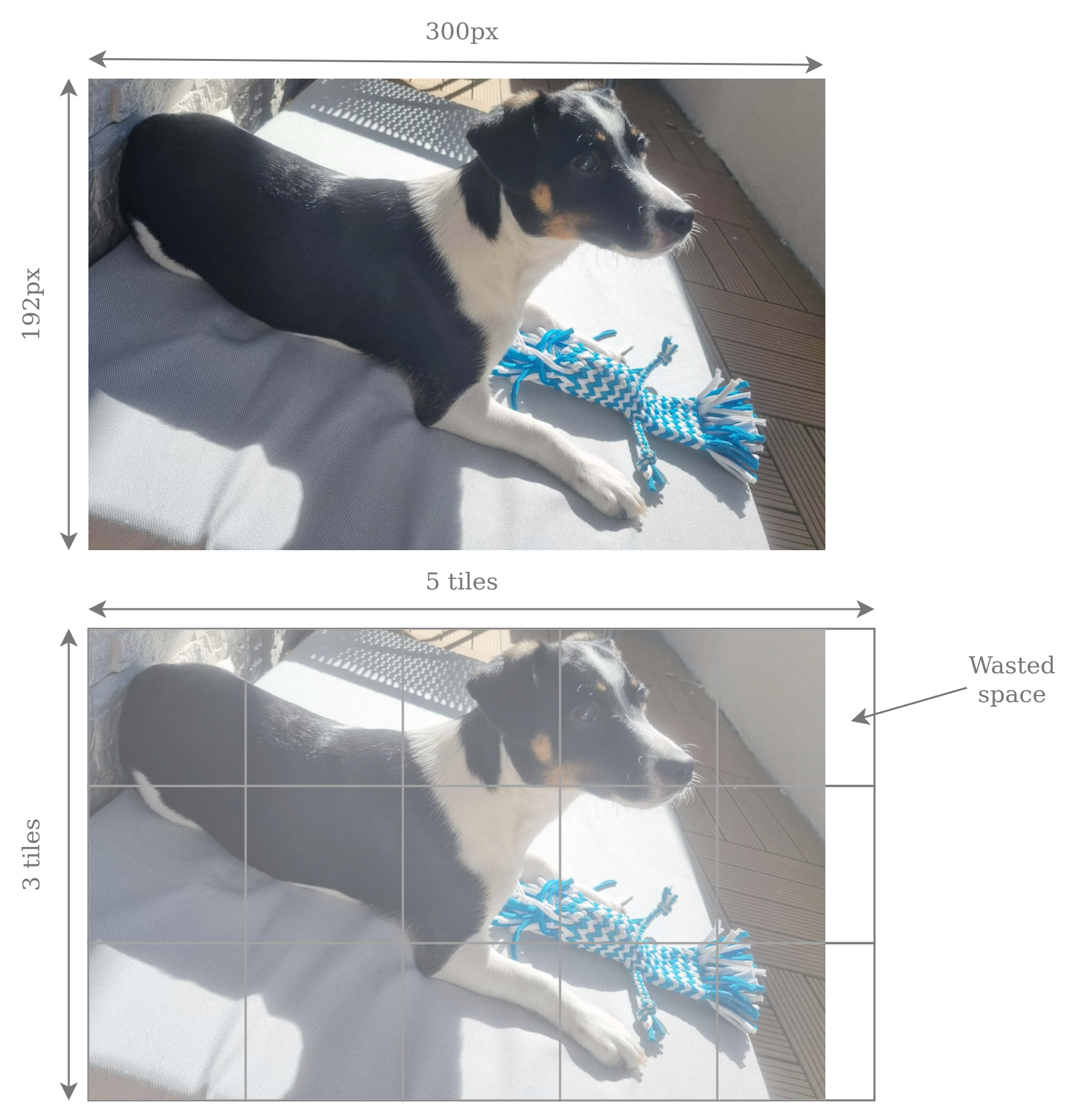
After doing some reading, thought experiments and chats with LLMs, I have compiled a table of pros and cons of both approaches. For simplicity I assumed 64x64 tile size which seems to be a safe default.
| Criterion | 64×64 tiles | Single VkImage |
|---|---|---|
| Max canvas size | Bounded only by available GPU memory. | Bounded by maxImageDimension2D. Typically it’s 16384, so it shouldn’t be a problem |
| Code simplicity | Generally more complex. | Simpler. |
| Graphics Pipeline usage | None. It’s impossible to draw over tiles with a single drawcall. Requires compute-based approach. | Possible to either use graphics-based or compute-based shading. |
| Undo/redo granularity | Tiles are natural boundaries. Save and restore entire tiles. | Must track dirty regions manually. I’d probably end up implementing tiles anyway. |
| GPU cache efficiency | Very good. I can write a shader processing a tile per workgroup and be sure workgroup uses 16KB of memory, fitting nicely in L1. | Less control, but GPUs typically allocate images in z-ordered blocks of memory anyway, so probably pretty good as well. |
| Vulkan API overhead | Worse, more descriptors, barriers and clears. | Lower. |
| Barrier GPU overhead | Better, fine grained barriers only for tiles that were processed. | Coarse grained full-image barriers. |
| Sparse canvas possibility | Easy. Just don’t allocate unneeded tiles. | Possible with sparse binding, but I’d have to implement tile-like mechanisms anyway. |
| CPU/GPU transfers | Easy. Track last access for each tile and copy entire tiles whenever needed. | Must track dirty regions manually. I’d probably end up implementing tiles anyway. |
| Scratch efficiency (more on that later) | Efficient. Scratch tiles allocated only where tool touches. | Either inefficient full image scratch or implementing tiles anyway. |
The single image implementation does seem appealing in some cases, but I’d really hate how often I’d have to write a tile-like system anyway. I’m going to stick with tile-based architecture and put up with a bit more complexity with descriptors, barriers and inability to use graphics pipelines.
Updating the canvas
We know how we’ll store the canvas. But how to update it? Each tool, such as a pencil, rectangle or rubber, will be its own compute shader. The inputs and outputs will vary, but usually it will be: a buffer with inputs (think cursor position, color, line width) and an array of output tiles. However, the process is not as straightforward as simply writing to the canvas tiles.
Consider using a rectangle tool.
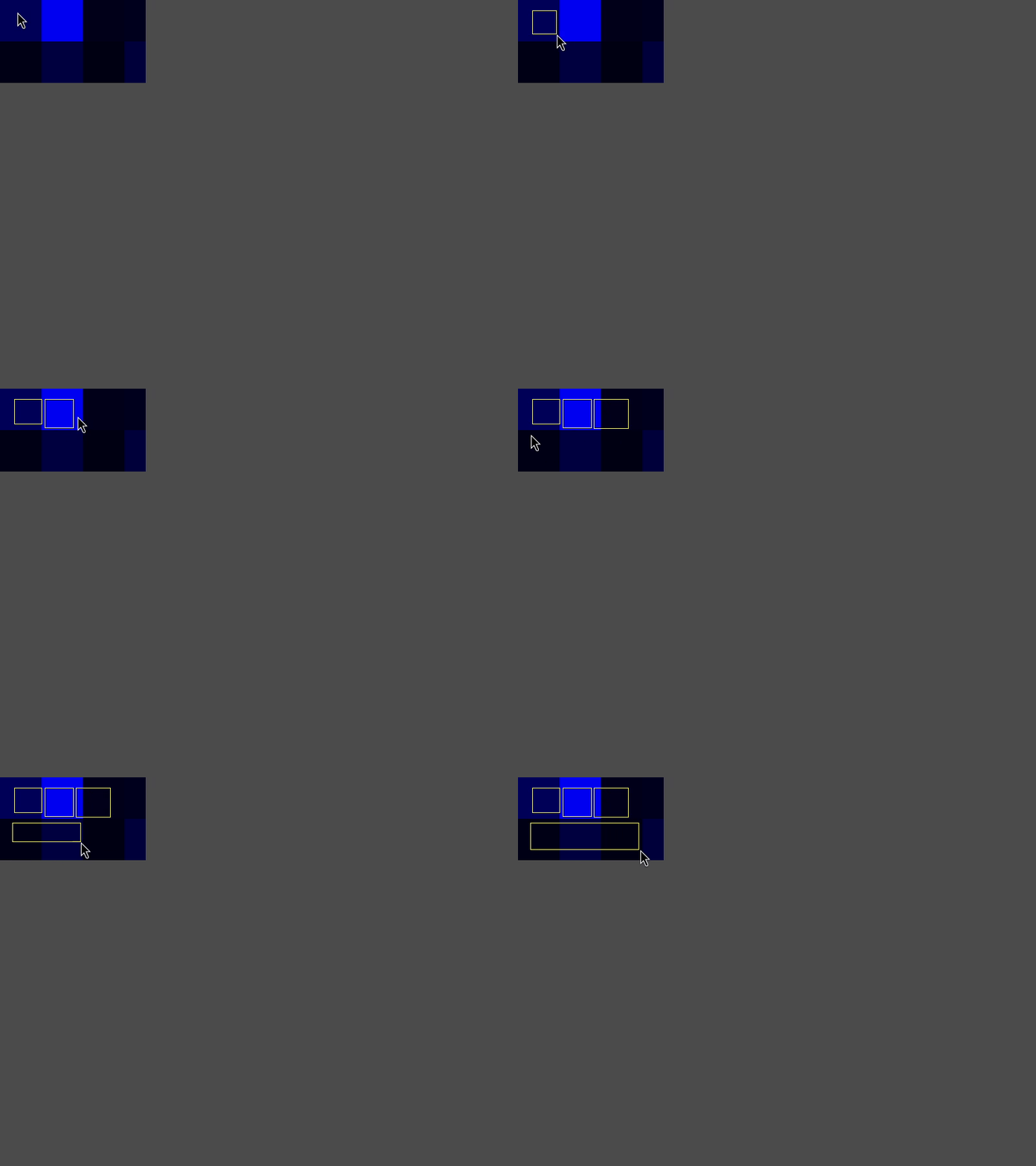
The user starts clicking and starts dragging the mouse.
The editor shows a preview of how the rectangle will look and constantly updates it.
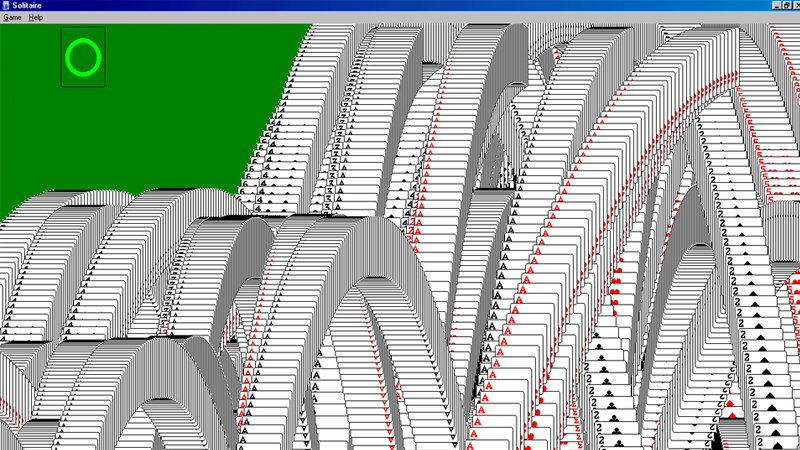
This preview cannot be written straight to the canvas or else we’d see each and every preview that was ever shown.
Kind of like solitaire ending animation, which is actually based on a common graphics bug when the color buffer was not cleared.
This preview has to be written to a separate layer, that will be composed on top of the canvas layer. It has already been mentioned in the table in the previous section. I’m going to call this layer scratch tiles.
The process is as follows. Before every tool invocation we’ll analyze which tiles will be touched and allocate scratch tiles from a pool. That’s the cool part about tiles - they can be sparsely allocated. No need for storing an entire scratch image. A tool will write to the scratch tiles1. Unused pixels will be left with zero alpha value. At the end of every frame EditorEngine will run a compose shader, which will merge the canvas tiles and the scratch tiles into a single image. Scratch tiles will be alpha blended on top of canvas tiles. When a tool finishes execution (user releases the mouse button), EditorEngine will run a commit shader, which will write the scratch tiles into canvas (also alpha blending).
This allows for easy discarding of the current tool execution. It also serves the role of tracking changes for undo operations. Before we commit to canvas, we can look at what scratch tiles we have and save the corresponding canvas tiles.
First tool
I’ve been thinking about what the simplest possible tool to implement first would be. My first thought was a pencil. It seems simple, but actually you have to implement line rasterization in a compute shader.
I decided the simplest tool is the rectangle tool, which I’ve already used as an example before. Generic shape rendering may be more challenging2, but a specialized shader for just drawing a rectangle is simple enough. Anyway, here it is:
#version 460
#extension GL_EXT_nonuniform_qualifier: enable

// Resources
layout(set = 0, binding = 0) buffer TileCoords { uvec2 tileCoords[]; };
layout(set = 1, binding = 0, rgba8) uniform writeonly image2D tiles[];

layout(push_constant) uniform PushConstants {
    ivec2 startPos;
    ivec2 endPos;
    vec4 outlineColor;
}
pc;

layout(local_size_x = 8, local_size_y = 8, local_size_z = 1) in;
void main() {
    // Read info about our tile. Each group computes one tile. Shader is dispatched only in x direction.
    const uint tileIndex = gl_WorkGroupID.x;
    const uvec2 tileCoord = tileCoords[tileIndex].xy;

    // Each thread processes 8x8 portion of the 64x64 tile
    for (int localY = 0; localY < 8; localY++) {
        for (int localX = 0; localX < 8; localX++) {
            // Calculate coords.
            const ivec2 localPixelCoord = ivec2(8 * gl_LocalInvocationID.xy + ivec2(localX, localY));
            const ivec2 globalPixelCoord = ivec2(tileCoord) * 64 + localPixelCoord;

            // Both x,y coordinates must line up with any of the start/end position
            vec4 color = vec4(0, 0, 0, 0);
            const int x1 = min(pc.startPos.x, pc.endPos.x);
            const int x2 = max(pc.startPos.x, pc.endPos.x);
            const int y1 = min(pc.startPos.y, pc.endPos.y);
            const int y2 = max(pc.startPos.y, pc.endPos.y);
            const bool xMatches = (globalPixelCoord.x == x1 || globalPixelCoord.x == x2);
            const bool yMatches = (globalPixelCoord.y == y1 || globalPixelCoord.y == y2);
            const bool xInRange = (x1 <= globalPixelCoord.x && globalPixelCoord.x <= x2);
            const bool yInRange = (y1 <= globalPixelCoord.y && globalPixelCoord.y <= y2);
            if ((yMatches || xMatches) && xInRange && yInRange) {
                color = pc.outlineColor;
            }

            // Write to tile image
            imageStore(tiles[tileIndex], localPixelCoord, color);
        }
    }
}
Each threadgroup of this shader processes a single scratch tile. The workgroups are 8x8, the tiles are 64x64. As a result, each thread has to process an 8x8 square of pixels3. Note the tile size is entirely hardcoded into this shader. I made a decision of not supporting multiple tile sizes, because it greatly complicates things and I highly doubt a tile size of 64x64 would ever cause significant performance problems.
The first resource binding is a buffer with tile coords. Since the scratch tiles are sparsely allocated, we cannot derive their global position from the workgroup id alone. Hence, this buffer is a lookup table - it maps a workgroup index to the tile coordinate the workgroup will be working on.
The second resource binding is an array of storage image descriptors.
I’m using VK_EXT_descriptor_indexing extension to be able to bind an unbounded array of descriptors and index them dynamically in the shader.
The third binding are push constants with some uniform values - the dimensions of the rectangle and its color.
I could have also packed those into the buffer with tile coords, but push constants generally yield a bit better performance due to less indirections.
So I tend to stick to them when possible, because they don’t really complicate the code4.
Note it was not possible for tileCoords, because the size of push constants is limited and we can potentially have thousands of entries.
I’m not gonna explain the code that checks whether a pixel lies on the rectangle or not, as it’s just simple math, nothing fancy.
The shader will either write out the rectangle color or a (0,0,0,0) pixel.
Zero alpha is intentional here.
Remember compose and commit shaders will perform alpha blending.
Those zeroed pixels will effectively be ignored and we’ll just see what’s in the canvas.
The pc.outlineColor will always be fully opaque (alpha of 1), so it will fully cover the underlying canvas pixel when alpha blended.
Alpha values between 0 and 1 will probably be used for things like brushes, which are either textured or antialiased.
We won’t need them now, though.
One other thing worth noting is the imageStore line.
Notice I’m indexing the descriptor array with tileIndex.
Normally it’s recommended to wrap the index with nonuniformEXT to ensure correctness (a SPIR-V requirement).
However in this case it’s not needed, because we can guarantee the access will be dynamically uniform, meaning all threads in the workgroup will use the exact same index.
We know this, because tileIndex = gl_WorkGroupID.x.
The shader is dispatched by EditorEngine.
It looks at user inputs, determines the region that will be affected by the tool, allocates the scratch tiles and fills all the buffers.
The number of workgroups in x direction is equal to the number of tiles affected.
Dispatch dimensions y and z are always one.
Compose and commit
We’re creating scratch tiles and rendering a rectangle. Now we’d like to actually see them on the screen.
We talked earlier about alpha blending scratch tiles onto the canvas. Compose shader will do it every frame in order to show preview of current tool’s influence. Commit shader will do it when the tool ends execution and wants to save its influence into the image.
The two operations are similar enough that I decided to merge them into a single source file and compile it twice with different preprocessor definitions5. Here it is in all its glory:
#version 460
#extension GL_EXT_nonuniform_qualifier: enable

#define VARIANT_COMPOSE 0
#define VARIANT_COMMIT 1

// Resources
layout (push_constant) uniform PushConstants {
    uvec2 canvasSize;
} pc;
layout (set = 0, binding = 0) buffer TileCoords {
    int scratchTileIndices[]; // dense, one index for each canvas tile (i.e. threadgroup)
};
#if VARIANT == VARIANT_COMPOSE
layout (set = 1, binding = 0, rgba8) uniform readonly image2D canvasTiles[]; // dense grid
layout (set = 2, binding = 0, rgba8) uniform readonly image2D scratchTiles[]; // sparse
layout (set = 3, binding = 0, rgba8) uniform writeonly image2D outputImage;
#elif VARIANT == VARIANT_COMMIT
layout (set = 1, binding = 0, rgba8) uniform image2D canvasTiles[]; // dense grid
layout (set = 2, binding = 0, rgba8) uniform readonly image2D scratchTiles[]; // sparse
#else
#error "Unknown shader variant"
#endif

layout (local_size_x = 8, local_size_y = 8, local_size_z = 1) in;
void main()
{
    // Thread&group indices
    const uvec2 localID = gl_LocalInvocationID.xy;
    const uvec2 groupID = gl_WorkGroupID.xy;

    // Compute linear image index
    const uint tileCountX = (pc.canvasSize.x + 63) / 64;
    const uint tileIndex = groupID.y * tileCountX + groupID.x;

    // Each thread processes 8x8 portion of the 64x64 tile
    for (int localY = 0; localY < 8; localY++) {
        for (int localX = 0; localX < 8; localX++) {
            // Calculate coords. Early return of out of bounds
            const ivec2 tileLocalCoord = ivec2(8 * localID + ivec2(localX, localY));
            const ivec2 dstGlobalCoord = ivec2(groupID) * 64 + tileLocalCoord;
            if (dstGlobalCoord.x > pc.canvasSize.x || dstGlobalCoord.y > pc.canvasSize.y) {
                continue;
            }

            // Read canvas tile
            vec4 color = imageLoad(canvasTiles[tileIndex], tileLocalCoord);

            // If there is a scratch tile, read it and blend into canvas
            const int scratchTileIndex = scratchTileIndices[tileIndex];
            if (scratchTileIndex >= 0) {
                const vec4 scratchColor = imageLoad(scratchTiles[scratchTileIndex], tileLocalCoord);
                color.rgb = (color.rgb * (1 - scratchColor.a)) + scratchColor.rgb * scratchColor.a;
                color.a = 1;

#if VARIANT == VARIANT_COMMIT
                imageStore(canvasTiles[tileIndex], ivec2(tileLocalCoord), color);
#endif
            }

            // Write to output
#if VARIANT == VARIANT_COMPOSE
            imageStore(outputImage, dstGlobalCoord, color);
#endif
        }
    }
}
The shader code has 2 variants - one for compose shader, one for commit shader. Note that from Vulkan’s perspective they will become two completely different shaders, with their own SPIR-V code, compute pipelines and bindings.
There is an identical thread to pixel mapping as in the rect shader - each threadgroup processes a tile, each thread processes an 8x8 square of pixels.
Both variants will read a pixel from canvas and optionally alpha blend a pixel from scratch if a tile exists (remember scratch is sparsely allocated).
The scratchTileIndices buffer will contain an index of a scratch tile for every workgroup.
This can potentially be -1 to denote there is no scratch tile active.
The two variants differ in what they do with the result. Commit shader writes back to the canvas tile, compose shader writes to a single big output image.
The output image from the compose shader is going to be passed from EditorEngine into the Gui class, which will embed it inside the UI. Yes, we’re leaving the tile-based world here, but I don’t see a reason to pass tiles to the Gui. It has to be composed to a single image at some point.
One possible optimization would be to skip tiles that won’t be visible, e.g. when the image is cropped or panned in the GUI. But I’ll ignore it for now.
Conclusion
I omitted tons of CPU-side code, like image creation and clearing, descriptor management, pipeline compilation, barriers, swapchain and much more. They are important, but not that interesting and you can read about them in virtually any Vulkan tutorial.
I’ll leave you with this GIF6 of a working rectangle drawing on a hardcoded canvas size, with a hardcoded yellow color, no UI and some bogus background to show me where the tiles are.
Next up we’ll zoom in on the testing framework for Pint. There will be a lot of behavior to get right, and I’d rather not break it every other commit.
It will also potentially clear it beforehand. Not every tool will need this. For instance - rect tool will clear and draw its rectangle each frame. But pencil will never clear, because it wants to retain drawings from previous frames. ↩︎
I don’t have a clear vision for it yet. Would probably have to triangulate the shape and implement a compute-based rasterizer, since I can’t use graphics pipeline for tiles. ↩︎
A different pixel-to-thread mapping could be more performant here, but I’d like to keep the code simple and just make it functional at this stage. ↩︎
This is going to be a recurring theme in this early stage of development. Whenever I can optimize something, I’ll ask myself “to what extent does it complicate the code?”. ↩︎
Future me knows that it was a bad idea, because the compose shader required more sophisticated features later and I eventually ended up splitting them. ↩︎
Or is it JIF? ↩︎